$149.99 once per platform. No subscription. Also on the Mac App Store.
PRECISION, BUILT IN
Real plans. Real Caliper.
Mark up. Make the detail clear.Measure. Keep quantities with the plan.Compare. See the whole revision.
What Caliper is
Made for plans, not paperwork.
Generic PDF readers treat construction drawings like documents. Caliper treats them like drawings: scale-aware measurement, snap-to-geometry precision, vector-clean edits, and a markup suite engineered around the tools you'd reach for on a hard copy — pencils, scales, stamps, and a redline pen.
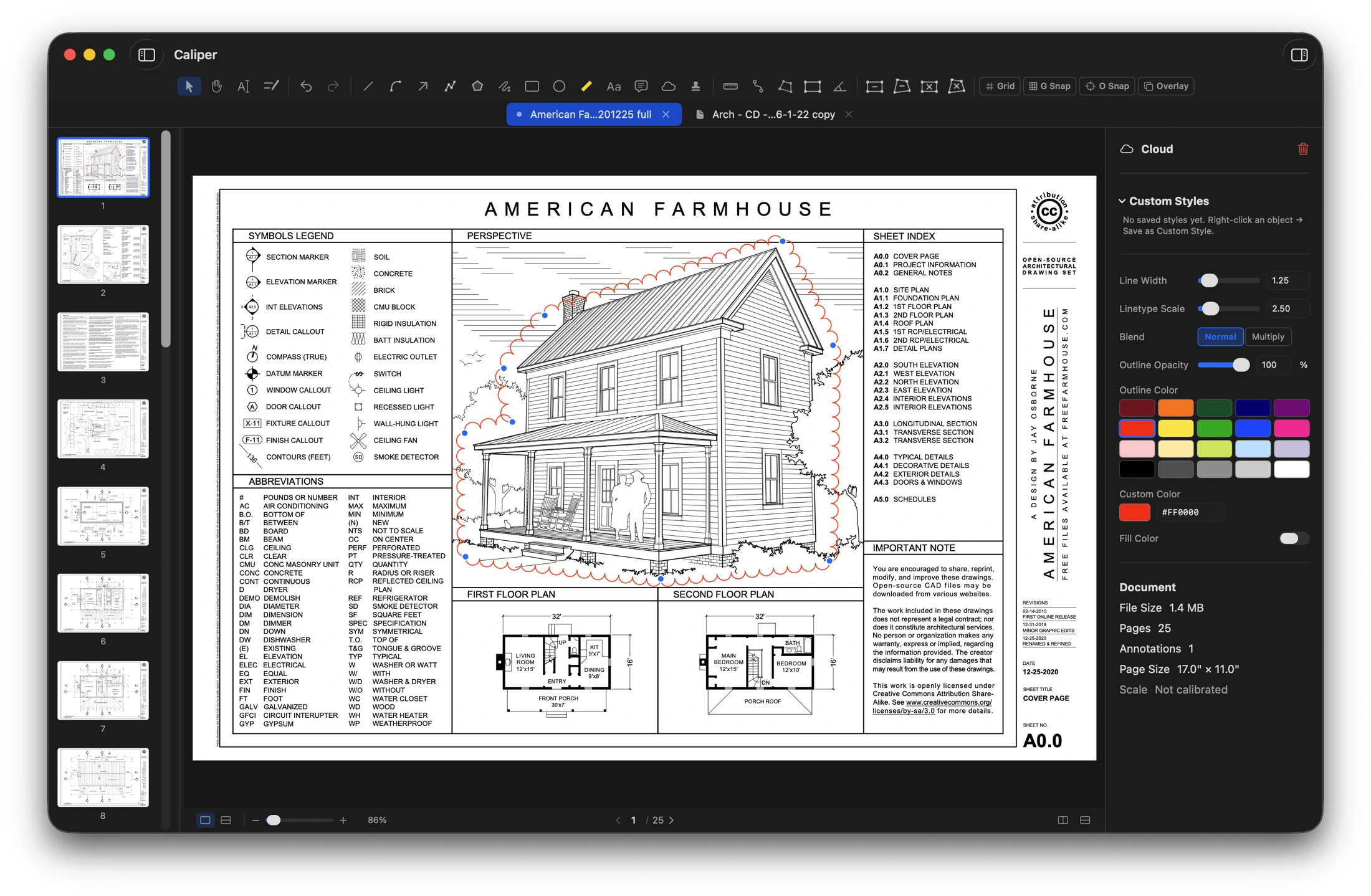
A whole set open at once — thumbnails, tabs and the inspector.
01 / Count on your drawing
Built for takeoffs.
Scale calibration is per-page, so a set with mixed scales doesn't fight you. Caliper parses every architect's shorthand — fractions, feet-inches, decimal feet, metric — and converts cleanly between them.
1
Set the scale.
Calibrate each page with two points, or let Auto-Scale read the printed scale legend straight off the sheet.
2
Measure what matters.
Linear, poly, area and angle dimensions. Area and perimeter outputs keep quantities together.
3
Total it. Export it.
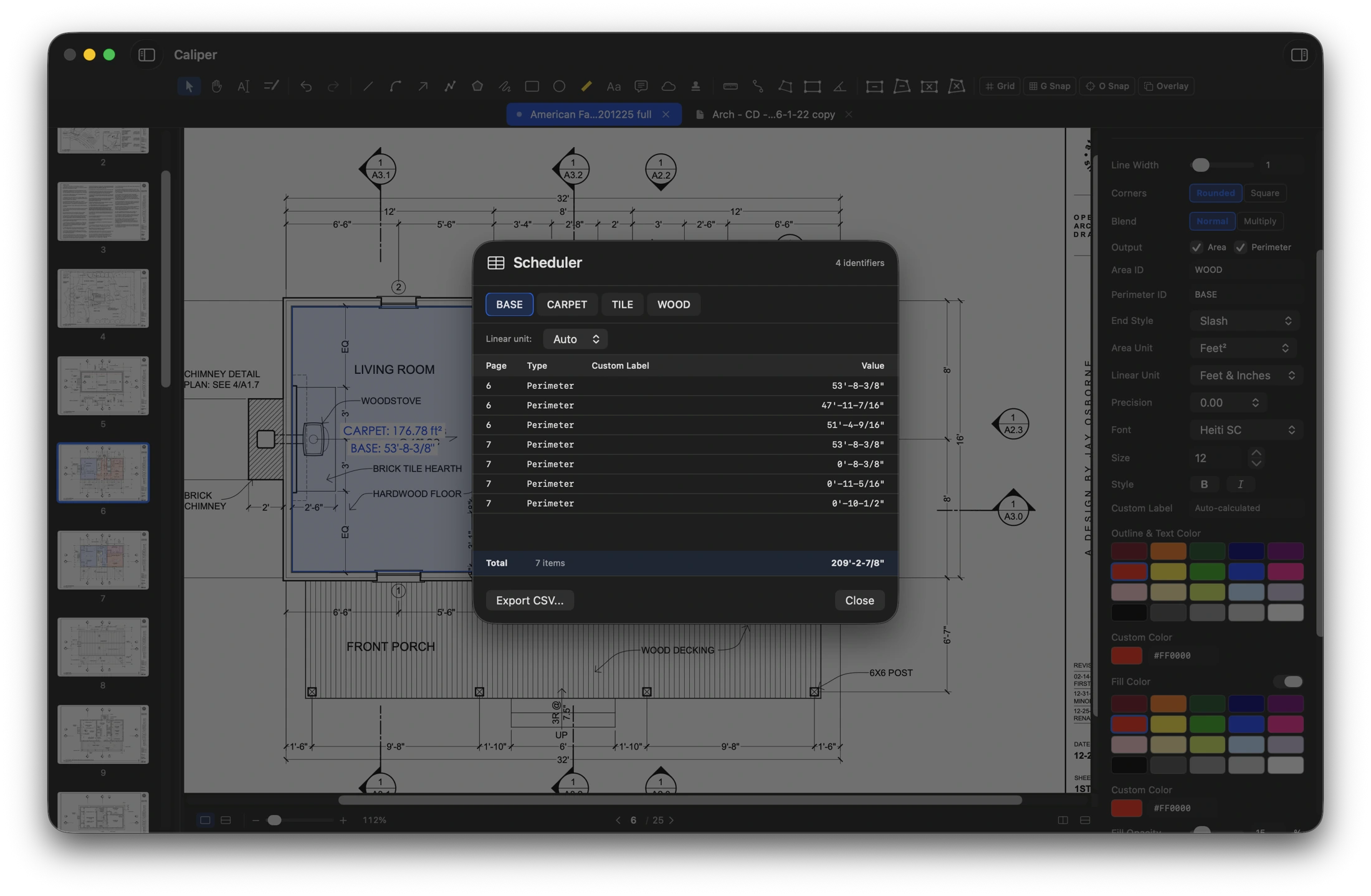
Group quantities by identifier in Scheduler, then export a CSV for your estimating workflow.
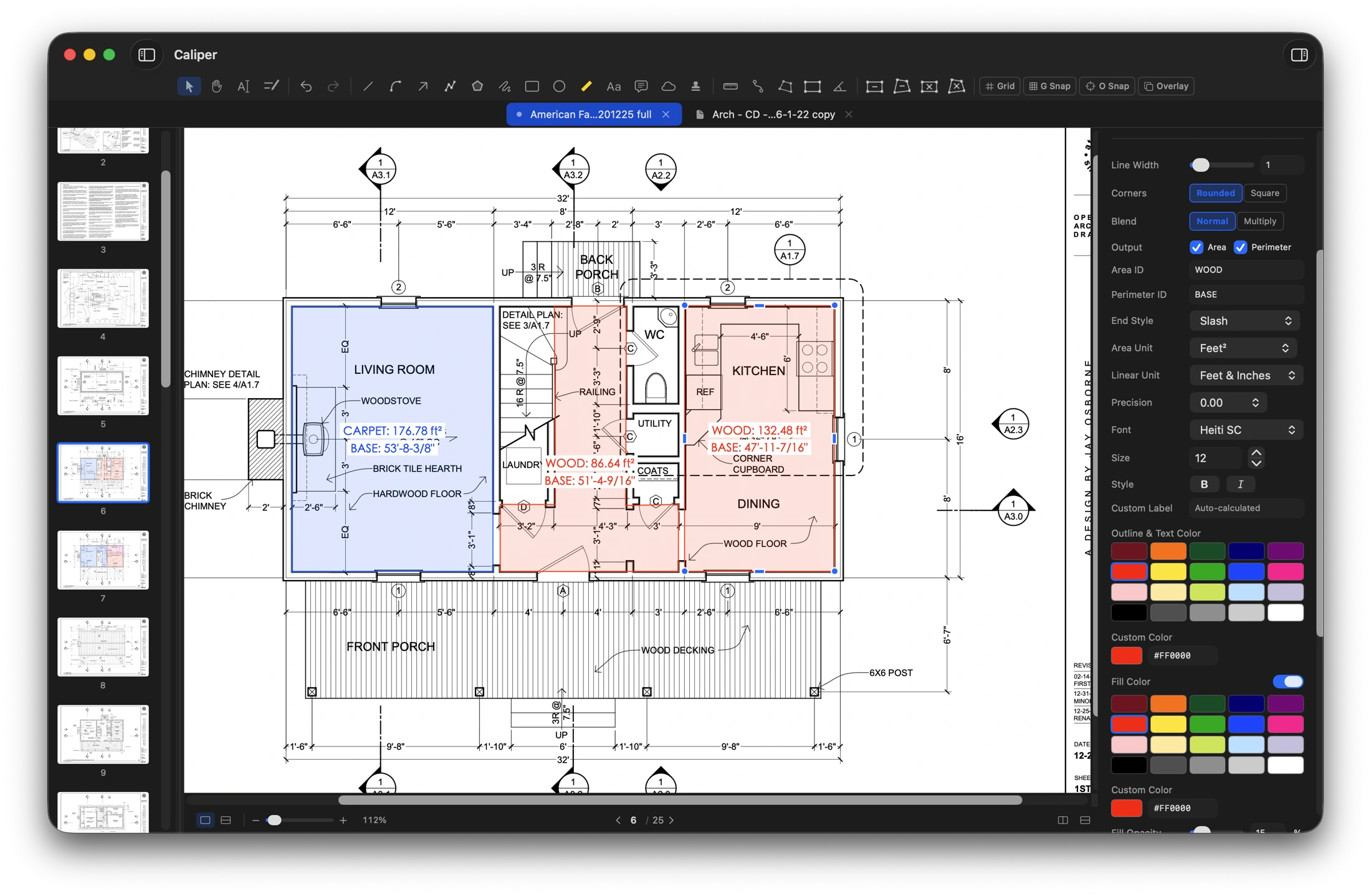
Areas filled, tagged and totalled directly on the plan.
Auto-Scale region picker reads printed scale legends via on-device OCR
Per-page calibration — only affects the page you're working on
Measure
Linear dimension
Poly dimension (multi-segment total)
Area dimension with unit conversion (sq ft, sq m, etc.)
Area dimension scheduler — tabulate and total your area takeoffs, grouped by identifier, into a single schedule
Angle measurement (3-click vertex)
Dimension text override on any annotation
Display formats
Decimal inches
Fractional inches
Decimal feet
Feet & inches
Centimeters
Meters
Millimeters
Snap & precision
Object Snap (O) locks drawing and measurement tools to the PDF's own vector geometry — endpoints, intersections, midpoints and edges — so every dimension lands exactly on the drawing instead of near it
Optional grid overlay with customizable spacing, color and opacity
Grid Snap (G) locks tools to grid intersections for fast, aligned layout work
The Scheduler groups every tagged area by identifier, totals it, and exports the whole schedule to CSV.
02 / Make your mark
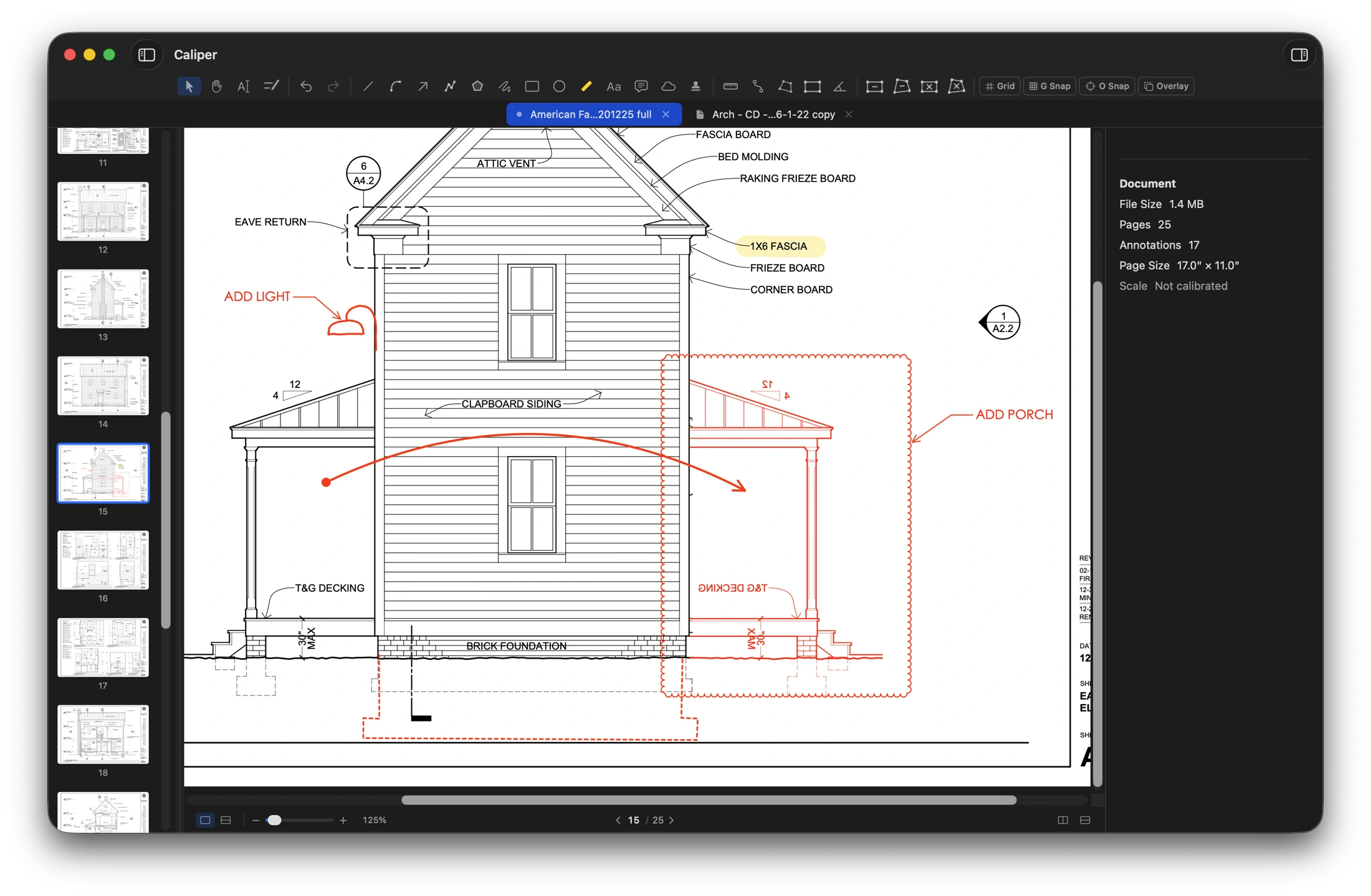
A complete markup suite.
Every drawing tool you'd expect from a redline workflow, with the style controls of a vector editor. Tools snap, dimensions update live, and a multi-select inspector only touches the properties you actually change.
Callouts, clouds, arrows and freehand markup on a real elevation.
Multi-select inspector — change a single property across a mixed selection without overwriting the rest
03 / Review the whole picture
See what changed.
Keep the detail and the bigger picture in the same workspace.
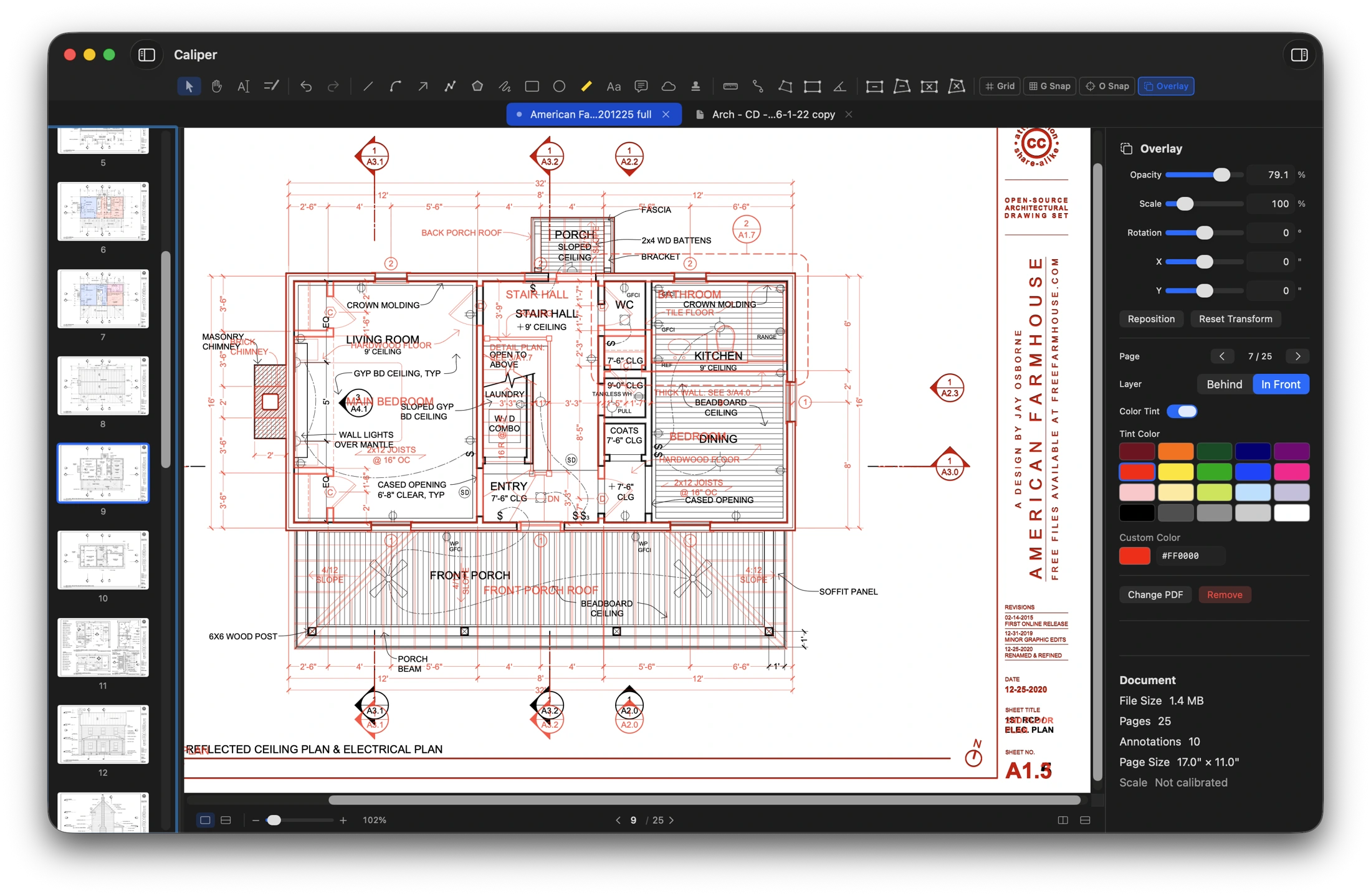
Layer your revisions.
Lay one drawing over another with adjustable opacity, scale, rotation and a color tint — in front or behind — to compare revisions, check fit, and see exactly what changed between two sets.
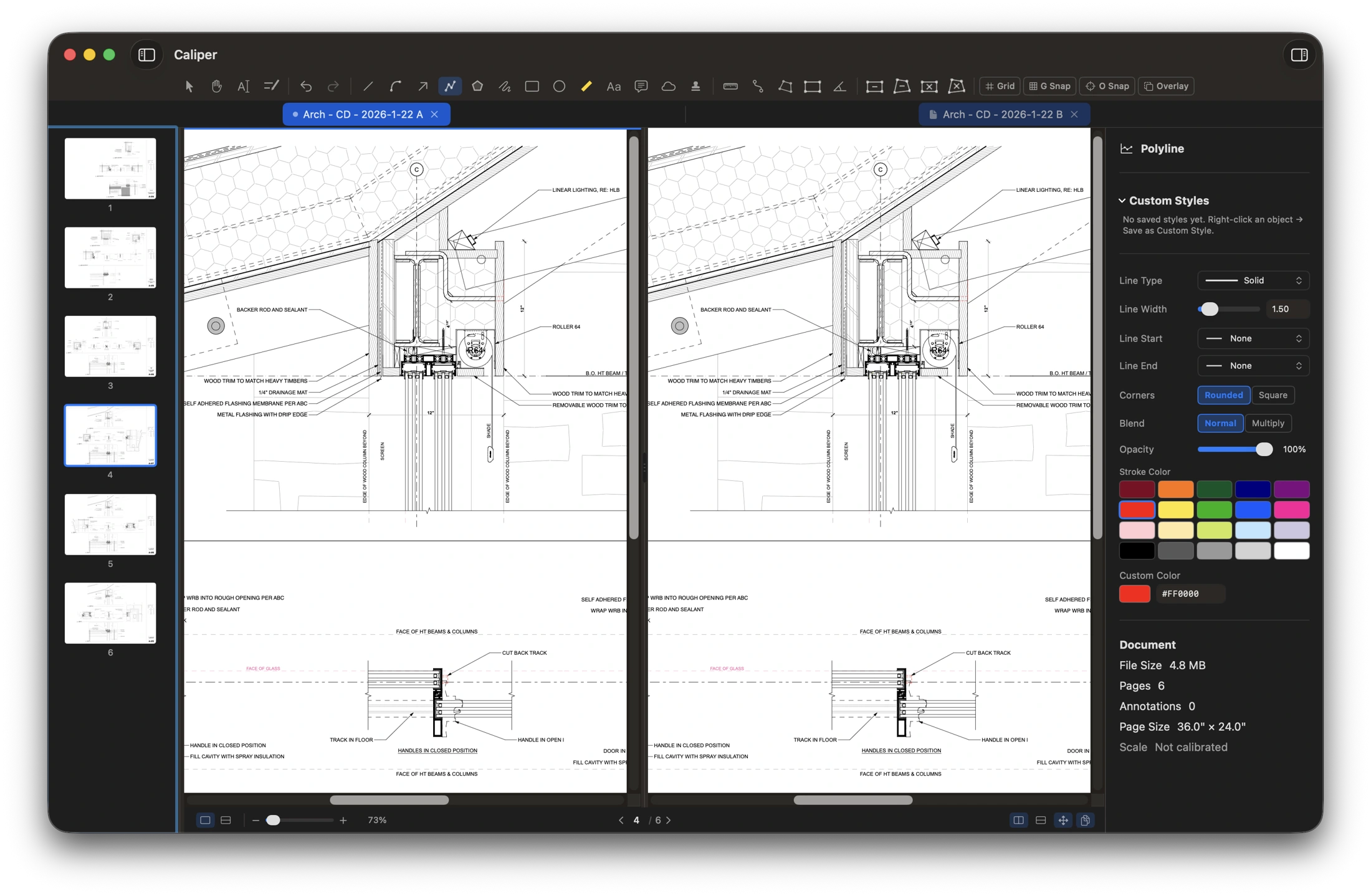
Look side by side.
Open two documents side-by-side and keep scroll and zoom in lockstep. Cross-reference details and drag pages between tabs without switching windows.
Your working day
A document workflow that respects your time.
Tabs, sidebars, and auto-save that write your markups straight into the PDF — one file, no loose attachments — and keep every annotation fully re-editable each time you reopen it.
Documents & tabs
Multi-tab document interface
Auto-save annotations straight into the PDF — no extra files alongside it
Reopen any PDF to keep editing your markups — saves preserve /Rotate, content streams, and revisions cleanly
Reduce File Size — a quality slider re-compresses heavy scans and image-laden PDFs before you share or archive
New PDF dialog with page-size presets (Letter, Legal, A4, Tabloid, ARCH D, Custom) and landscape toggle
Pages
Drag-to-reorder pages in the thumbnail sidebar with live spread-apart preview
Copy & paste pages between documents
Insert blank pages, duplicate pages, delete pages
Multi-page selection for batch operations
Editing
Edit existing PDF text — click text already baked into the document to retype, correct, or remove it
Custom rotation cursor with zone hysteresis on annotation handles
Configurable toolbar — show or hide whole tool sections
Your stamp library, your way
Custom stamp library backed by PDF source files
Import any single-page PDF up to 2 MB — Caliper renders a thumbnail and adds it to the library
Stamps remain crisp vector data through every save and re-save
Rotation-aware rendering for thumbnails, print, and "Save PDF…" export on rotated pages
”
Why it exists
Made by a licensed architect who got tired of marking up plans with software that was never designed for the job. Caliper does what a working drawing set actually demands: real dimensions, honest area takeoffs, revision comparison, and markup that survives being handed to someone else.
A closer look
Specifications.
Native tools. Local document processing. A PDF workflow that stays with your files.
Platforms
macOS 14 Sonoma or later — Mac App Store or direct
Windows 10 / 11 — Microsoft Store
Apple Silicon and Intel — universal binary
File formats
PDF (1.4 through 2.0)
PNG / JPEG image import as vector stamps
Vector PDF clipboard interchange (round-trips with Preview, Illustrator, etc.)
Performance
Large-format support (24×36 and up)
Vector-preserving operations on save, cut, paste, and delete
On-device OCR for Auto-Scale (no network)
Per-page rendering cache for snap geometry
Privacy
All document processing happens on your computer
No telemetry, no account, no cloud
Your drawings never leave the machine
A one-time purchase
Your next project. No annual subscription.
$149.99Once. Per platform.
Try the full app free for 30 days — then a one-time $149.99 license unlocks output for good: saving, printing, exporting a flattened PDF or image, reducing file size and exporting a Scheduler CSV. Marking up is never gated. No subscription, ever. Also available on the Mac App Store.
One license per platform. The Windows license is a separate purchase from the Mac license. Licenses are sold by Caliper App LLC — not by Apple or Microsoft.